
Get the mobile app into the shed
The shed is a phone-and-tablet job. The office is a laptop job. Here's how to get the Calfmate Android app onto the device you actually use — and where it earns its keep over the web.
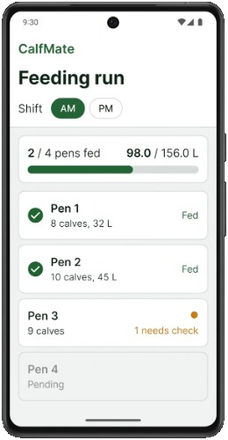
The Calfmate web app works on a phone, and it's a fine fallback. But the native Android app is what makes the software practical for the shed itself — chunky tap targets, sun-readable contrast, and the offline mode that keeps you moving when the steel shed eats your 4G signal. This is how to get it set up.
Devices supported (the honest version)
Android only at the moment. There is no iPhone app yet. If your shed is iPhone-only, the website works on mobile Safari and covers most of the same workflow — you just miss the offline mode.
How to install
There is one Android app. Open the download page on the phone — same username and password as the website. Settings has the same button after you sign in.
- Open calfmate.farmsystem.com.au/download on the Android phone or tablet.
- Tap Download the phone app.
- When it finishes, tap the file. Allow installs from your browser if Android asks.
- Tap Install, then Open, and sign in with your Calfmate username and password.
Workers get the app the same way — by signing in with their admin's link on their own phone, or, far more commonly, by sharing a single device in the shed.
Two sign-in modes
Pick the right one for your operation
- Personal sign-in — one user per phone. Each admin gets full access. Workers get worker-only access.
- Shared device — a tablet or phone in the shed, signed in once, with multiple workers picking themselves via a PIN screen. Every action gets logged against the correct worker. This is the typical shed setup.
For shared device setup, see the dedicated shared device guide.
What works offline
The Android app keeps shed work on the device with no signal, then syncs. That includes:
- Recording a feed (Mark fed) and a short feed (Drank less)
- Flagging a calf
- Recording a calving or adding a calf
- Recording a treatment dose
What needs a connection:
- Mate (look-up and save)
- The website — always
- Billing, and reports you have not opened before (cached numbers still show)
Offline actions go into a local outbox with a small indicator on the screen. When signal returns, the outbox syncs automatically — usually within seconds. If two workers happen to act on the same calf offline, sync resolves by last-action-wins on the server (rare in practice).
What's on the app
Roughly the same screens as the web, optimised for thumbs and sun:
- Dashboard (today's summary)
- Feeding (the main one)
- Calves
- Pens
- Tasks
- Health
- Treatments
- Settings (admins only)
Tap targets are intentionally chunky. Text is high-contrast and readable at 5am with cold hands.
Three small tips from real sheds
- Put the icon on the home screen, not buried in a folder. The fewer taps to open it, the more your team will use it.
- Bring a power bank. Mobile screens at 100% brightness chew battery, and you'll want full brightness in the morning light.
- Rugged silicone case — $20 of insurance against the inevitable drop. Most shed tablets we see are wearing one.
- Sign in once on the shed device with the shared login, set it to never lock, and use the worker PIN screen for individual logins. Way faster than typing email + password each shift.
When to use web instead
Phone for daily operations. Web for:
- Importing a CSV of calves (Calves → Import).
- Setting up Drug library / Task protocols / Treatment protocols.
- Reading Reports — bigger screen helps for charts and tables.
One thing to take away
The shed is a phone-and-tablet job. The office is a laptop job. Use the app where your hands are; use the web where your eyes need a screen. Both share the same data in real time — pick the device that fits the job in front of you.
Get the phone app
Same login as the website. The Android app works offline in the shed. No iPhone app yet. 30 days free, no card.