
Feeding mode — the daily shed round, guided
Most shed problems start at feeding time. Feeding mode is the screen Calfmate was built around — a half-asleep, cold-handed, gloves-on, 6am-friendly walk-through of the daily round.
It's a cold morning in late autumn. The vat's hot, the powder's measured, and the first cow lot is making the standard complaint. Somewhere down the back, your phone vibrates with the calf-shed equivalent of a wake-up call: it's time to feed. Open the app. The next half hour writes itself.
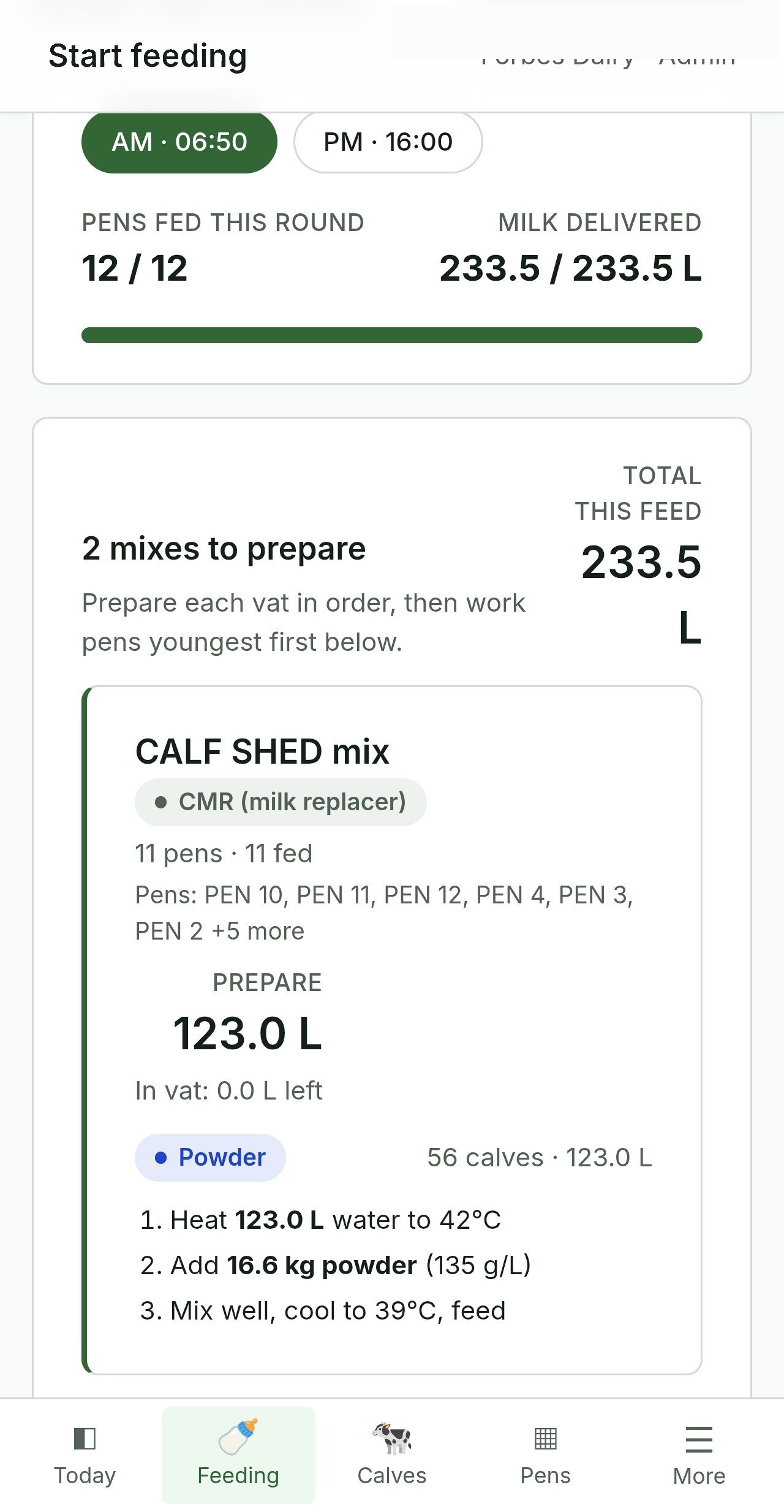
Feeding mode is the screen Calfmate was built around. It walks one person through the whole feeding round — the right amount of milk per pen, in the right order, with the right additives — and gives you a one-tap way to log who drank less. That last bit is the secret weapon.
Where to find it
Top nav → Feeding. Or the Dashboard's Start feeding button. Either takes you to the same screen.
What you'll see
Across the top: shift chips — usually AM 06:00, PM 16:00, or whatever you've set up. Calfmate auto-picks the nearest scheduled shift. Tap a different chip to switch.
Below that, the work is grouped by milk mix. A mix is one batch you make up in the vat — first-mix powder, whole milk, fortified, and so on. Each mix shows you:
- Prepare card: total litres for the mix and prep pills (how much powder, water, fortifier).
- The pens that drink from this mix, in feeding order.
- Each pen tile: calf count, planned litres, and a Mark fed button.
Across the top of the page, a progress bar reads "X / Y pens fed". When the bar fills, you're done.
The daily workflow
- Open Feeding.
- Confirm the right shift is selected (or change it).
- For the first mix: read the Prepare card and make up the vat. Then walk the pens that drink from it, in order, tapping Mark fed on each.
- Move to the next mix. Repeat.
- When the progress bar fills, the round is done.
Tap Undo if you marked a pen fed by accident. Tap again to redo. The app is built to be forgiving — cold hands are forgiven; fat fingers are forgiven; second-guessing yourself is forgiven.
The secret weapon: "Drank less"
Open a calf's row (the ⋯ three-dot menu) and tap Drank less…. Enter what she actually drank — say 1.5 L when the plan was 3 L. Calfmate:
- Records planned vs actual on her shift log.
- Automatically raises a Watch flag with the note "drank less at [shift]" — she now appears on the Health page.
- Colour-codes her row so the next shift sees it before they pour her milk.
This is how Calfmate catches the calves who go off-feed before they're visibly sick. Two short feeds in a row is almost always the first sign of trouble — and they'll already be flagged before anyone's noticed.
Flagging from the feeding screen
From the same ⋯ menu, Flag this calf… opens the flag dialog with three types: Watch, Health check, Electrolytes. (We've written a separate flag guide; the short version is: flag generously, write specific notes, the next shift will thank you.)
Mixes and the "Remaining" group
You define your mixes in Settings → Milk mixes. Each mix has its own pen list. Pens that aren't in any mix get grouped automatically into "Remaining" at the bottom and feed last. A common setup:
- First mix — powder/milk replacer for pens 0–14 days.
- Whole milk — older pens on fresh cow's milk.
- Fortified — late-weaning pens on whole milk plus a powder top-up.
Setting it up this way means one person walks the shed in mix order: make a vat, feed everyone on it, make the next vat, feed those, done. No backtracking.
Weaning calves in the list
Calves in step-down weaning show a Weaning badge, with their per-day reduced litres calculated automatically from your Settings → Weaning rules. You don't have to do anything different — just feed what the screen says. (If you want to change the rules, that's a Settings change, not a daily decision.)
The colour code on the rows
Glance at the row, know the status
- Red tint — under treatment, withdrawal active, do not sell.
- Orange tint — Health check flag.
- Yellow tint — Electrolytes flag.
- Light yellow — Watch flag.
- Green corner — already fed this shift.
A couple of quirks worth knowing
- Only pre-weaning active calves on milk appear here. Dry, weaned, sold, deceased — all hidden.
- "Nothing to feed" usually means you've got no active pre-weaning calves, or your shift chips don't match the calf ages.
- The Mixing detail link sends you to the milk calculator if you want the maths broken down.
- On the Android app, Mark fed works offline. Web is online-only.
One thing to take away
Feeding mode isn't paperwork. It's a feed plan with built-in "who got less today" detection. Treat it like the shift checklist it is, and your morning round gets faster, your health flags get earlier, and your shed runs better.
The whole feeding run, in your pocket
Offline-capable Android app for the shed. Web dashboard for setup. Unlimited staff logins. 30 days free, no card.